
This page describes the life of a route plan using the Route Optimization API, starting from identifying your routing needs and finishing with an integrated route plan in your system.
When you follow the stages of the route plan, you can achieve the following objectives:
- Map your fleet operations: Translate your physical fleet, complex constraints, and business goals into code for the API.
- Optimize route plans for your business: Understand how to refine your route plan so it can meet your goals and improve your daily operations.
- Deploy to production: Implement your route plan by including it in your everyday operations.
The following diagram shows the life of a route plan.
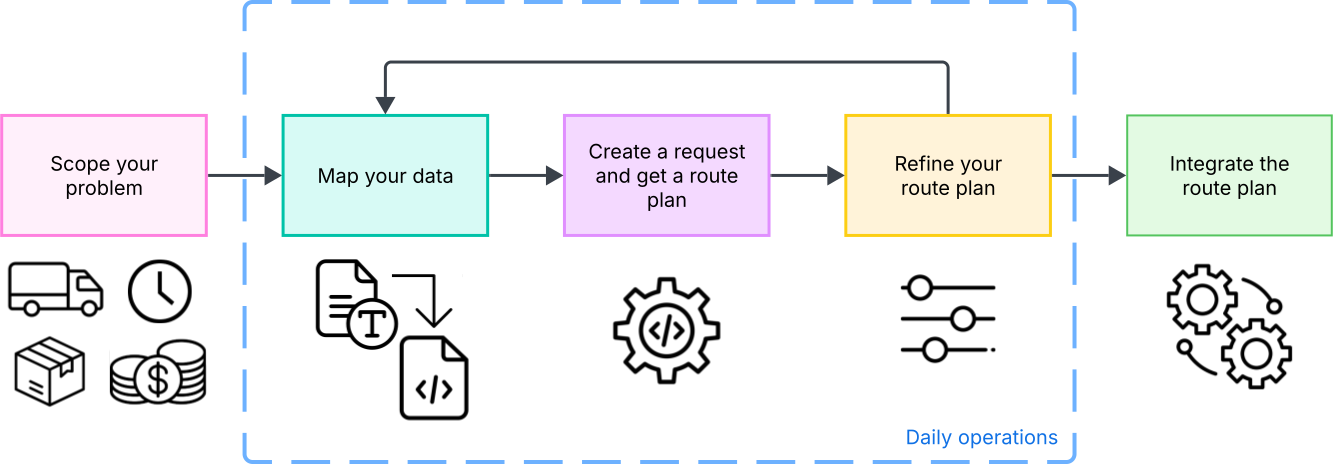
The implementation phase of a route plan happens when you first integrate the API or when your business requirements change significantly. It covers stages 1 through 5.
The daily operations phase is more lightweight, and refinement is minimal. It covers stages 2 through 4.
The life of a route stages are the following:
- Scope your problem: Identify and organize your objectives, resources, tasks, and constraints to have a complete picture of your operations before you start using the API.
- Map your data: Translate your business reality into API parameters so the route plan reflects how you need your fleet to operate.
- Create a request and get a route plan: Enter your data into the API and get your optimized route plan.
- Refine your route plan: Test your route plan and iterate on it by adjusting your constraints and objectives to make sure it covers all your needs.
- Integrate the route plan: Connect the route plan to your existing systems to provide actionable navigation.
Scope your problem
Before using the API, you need to organize the details of your day-to-day operations into clear data categories. This lets you start your implementation process with clarity on what are your current resources and tasks, what constrains them, and what are the objectives you want to achieve with your fleet.
Identify your resources and tasks
An important step when planning for your route plan is identifying your resources and tasks, which are your vehicles and shipments.
| The vehicles | The shipments |
|---|---|
|
|
Identify your constraints
Your constraints are the limits and restrictions on how you can use your vehicles and how you need to handle your shipments. They dictate most of your operations and are vital when creating an optimized route plan.
Constraints generally fall into two categories:
| Hard constraints | Soft constraints |
|---|---|
| These are limits that can't be broken. For example, a truck can't carry more weight than its maximum capacity, and a driver can't make a pick-up after a store has closed. | These are preferences that can be violated if necessary, usually at a penalty cost. For example, you might prefer to load a truck only to 80% capacity, or deliver before a target time, but you are okay with exceeding these limits to get a better route. |
Common constraints include:
- Capacity limits: The maximum weight, volume, or number of items a vehicle can carry.
- Time windows: The specific time slots when a location is open for a visit, or the specific shift hours of a driver.
- Costs: The cost of running a vehicle or skipping a shipment. One of the main goals of the API is to generate a cost-effective route plan.
- Driver breaks: Driver rest periods typically required by labor laws after a certain number of working hours.
Establish your business objectives
Once you establish your resources and tasks and their limitations, it's time to establish which metrics matter most to your business. These objectives go hand in hand with constraints, and they help you decide what matters the most when planning a route.
The following are some examples of business objectives:
| Fleet size | Distance | Time | Cost |
|---|---|---|---|
| Do you want to minimize the number of vehicles used, or use your full fleet to finish the work day earlier? | Do you want the shortest path to save on fuel, or do you prefer a faster route that might be longer due to the use of highways? | Do you want to minimize the total hours worked, or prioritize arriving at specific times which can lengthen the time spent on route? | Do you want to minimize operational expenses like wages and fuel, or accept higher costs to meet strict deadlines? |
Map your data
Once you have gathered your data, map it to match the API's properties. This gives the optimizer all the information to return a route plan that takes in account your business reality.
Use the parameters in the next tables to map the resources, tasks, constraints, and objectives you mapped in the Scope your problem section.
Variable mapping
| Real-world concept | API parameter | Description |
|---|---|---|
| Driver or vehicle | model.vehicles[] |
Represents a single vehicle in your fleet. |
| Depot locations |
vehicles[].startWaypointvehicles[].endWaypoint
|
The location where the vehicle starts and ends its route. |
| Your business hours |
model.globalStartTimemodel.globalEndTime
|
The earliest start time and latest end time for the entire fleet's operation. |
| Task or package | model.shipments[] |
Represents a job. Can be a pickup, a delivery, or both. |
| Task location |
pickups[].arrivalWaypointdeliveries[].arrivalWaypoint
|
The geographical location where the job takes place. |
| Service time |
pickups[].durationdeliveries[].duration
|
The time spent at the location completing the task (for example, unloading), not including travel time. |
Constraint mapping
| Real-world constraint | API parameter | Description |
|---|---|---|
| Vehicle capacity | vehicles[].loadLimits |
Sets the hard or soft limit for vehicle capacity. If a shipment's loadDemand exceeds the remaining limit, it is not assigned. |
| Package size | shipments[].loadDemands |
The amount of vehicle capacity a shipment consumes. |
| Vehicle restriction | shipments[].allowedVehicleIndices |
Restricts a shipment so it can only be picked up or delivered only by specific vehicles or drivers. |
| Available hours | shipments[].pickups[].timeWindows or shipments[].deliveries[].timeWindows |
Sets the available hours to visit a location. If a vehicle cannot arrive within this window, the shipment is skipped. |
| Shift length limit | vehicles[].routeDurationLimit |
Sets a hard or soft cap on how long a specific driver can work (for example, max 8 hours), regardless of the global end time. |
| Driver breaks | vehicles[].breakRule |
Enforces specific rest rules, such as mandatory breaks after certain hours of work. |
| Road restrictions | vehicles[].travelMode |
Specifies the mode of travel (for example, DRIVE or BICYCLE). This restricts the route to legal roads and it determines the speeds used to calculate travel times. |
Objective mapping
| Real-world objective | API parameter | Description |
|---|---|---|
| Minimize fleet size | vehicles[].fixedCost |
Applies a one-time cost for using a vehicle. A high fixed cost forces a route to prioritize using fewer vehicles over increasing total distance or working time. |
| Minimize distance | vehicles[].costPerKilometer |
Applies a cost for every kilometer traveled. Prioritizes shorter routes to save on fuel and wear. |
| Minimize total time | vehicles[].costPerHour |
Applies a cost for every hour the vehicle is active (including travel and wait time). Prioritizes faster completion. |
| Minimize drive time | vehicles[].costPerTraveledHour |
Applies a cost specifically for time spent moving. This distinguishes between sitting in traffic (expensive) and waiting at a stop(potentially cheaper). |
| Prioritize certain tasks | shipments[].penaltyCost |
Applies a cost if a specific shipment is skipped. Setting this high ensures critical tasks are prioritized over optional ones. |
Create the request and get a response
Using the Route Optimization API to generate a route plan involves the following steps:
- Configure your environment: Set up your Google Cloud project, enable the API, and configure authentication. For instructions, see Getting started. You only have to follow this step once.
- Send the request: Construct the request body using the data mapping defined in the previous section. For information on endpoints, headers, and request formatting, see Make an API request.
- Understand the response: Once you get a response from the API, understand the route plan and what each parameter means. See Interpret a response.
Refine your route plan
Translating real-world logistics into API costs and constraints is a complex task. Your initial route plan might not match your business objectives or driver expectations. Refining your route plan is the iterative process of testing your returned routes and adjusting your parameters until you find a setup that achieves your goals.
Adjust objectives and constraints
If the generated route plan does not meet your needs, you can modify certain parameters to achieve different results. Tightening or relaxing parameters alters how conflicting goals are solved in the route plan, and relaxing parameters is an efficient way to discover the parameters that are causing errors in your route plans.
The following table lists common routing issues and the parameters you can adjust to resolve them.
| Scenario | Parameter | Adjustment | Description |
|---|---|---|---|
| An important shipment is skipped | shipments[].penaltyCost |
Increase its value, or add penalty costs to other shipments | If the shipment is optional, increase its penalty cost to prioritize it. If the shipment is mandatory (has no penalty cost), add penalty costs to other, less critical shipments. This makes them optional, which frees up vehicle time and capacity for the important shipment. |
| Shipment skipped due to timing | softStartTime / softEndTime |
Add soft time windows | Hard time windows drop tasks that are even one minute late. Soft windows allow the driver to arrive slightly off-schedule by paying a "cost" rather than failing the assignment. |
| Shipment skipped due to weight | loadLimits[].softMaxLoad and costPerUnitAbove |
Add soft load demands | Allows a vehicle to slightly exceed its ideal capacity (for a penalty) rather than leaving a package behind. |
| Shipment skipped due to fleet overload | model.vehicles[] or shipments[].timeWindows |
Add vehicles or relax time windows | If there are too many shipments for the current fleet, especially during peak hours, add more vehicles or widen delivery windows to spread the workload. |
| Routes are too long or inefficient | vehicles[].costPerKilometer / costPerHour |
Add costs or increase their value | Tells the API that travel is expensive, encouraging it to drop distant, isolated stops to create tighter routes for the fleet. |
| Driver shifts are too long | vehicles[].routeDurationLimit or model.vehicles[] |
Add duration limits, or add vehicles and limits | Enforces a hard cap (for example, 8 hours) on the total time a driver spends on the road. Adding vehicles alone won't shorten routes unless you also apply duration limits to force the solver to distribute the workload across the larger fleet. |
Update a route plan
You often need to update a route plan while keeping the base the same, such as adding a pickup to an active driver's schedule. To do this, use injection parameters, which provide the API with a start based on your previous solution, allowing it to modify the existing plan rather than calculating a new one from scratch.
The following are different ways you can update a route plan with injection parameters:
- Pass the routes from a previous response into the
injectedFirstSolutionRoutesfield of your new request. This speeds up the optimization search and is useful for re-planning before daily operations start, such as integrating last-minute shipments. - Control the degree of change using the
injectedSolutionConstraintfield. This is useful when operations are already underway, allowing you to preserve the driver's current sequence or fix parts of the plan that have already been executed. - Ensure the updated route remains assigned to the correct vehicle by
setting
interpretInjectedSolutionsUsingLabelstotrue. This is useful in experimentation when adding or removing shipments and vehicles, as it matches routes using labels instead of indices. This requires all vehicle and shipment labels to be unique.
Integrate your route plan
Your finalized route plan is a data object representing an optimized management of your resources and tasks, while following your constraints and objectives. Use this route plan in your daily operations by integrating it into your system. This typically involves visualizing your route plan for fleet managers and dispatching turn-by-turn instructions to drivers.
Visualization
To allow fleet managers to verify and monitor your route plan, you can visualize your route plan in the following ways:
To allow fleet managers to verify and monitor your route plan, you can display it on a dashboard map. Depending on your current development stage, you can visualize your route plan in the following ways:
- Explore without code: You can use the open-source Route Optimization app to see how the API translates your data into physical paths on a map. This web application serves as an exploratory tool that lets you construct scenarios, tune constraint parameters, and visually render your resulting route plans before writing any code.
- Display the visit order: You can show the sequence of visits as numbered
points on a map to evaluate your optimization and dispatch plans in your own
system. To do this, locate the
visitsarray inside each route of the API response. The items in this array are ordered exactly as the driver should execute them. You can iterate through this list, use theshipmentIndexto retrieve the location coordinates for each stop, and use your mapping library to render numbered markers on the map based on their order in the list. - Draw the physical route: You can visualize the exact planned path on a map
to understand why the optimizer chose a specific sequence. This polyline
represents the intended path for planning and evaluation, not the real-time
route taken by a driver. Set
populatePolylines: truein your request to get anencodedPolylinefield for each route, and decode it using thegoogle.maps.geometry.encoding.decodePath()method from the Maps JavaScript API.
Dispatch to drivers
You can integrate turn-by-turn into your driver application using the Navigation SDK, or provide deep links to the Google Maps consumer app.
- Navigation SDK: If you have a custom driver application, you can integrate
the Navigation SDK for Android or
iOS for in-app turn-by-turn guidance.
You can integrate the task information from the API response into your system
and use the SDK for navigation. To pass the routes from the API response to
the SDK, set
populateTransitionPolylines: truein your request. This generates arouteTokenfor each transition in the response. - Fleet Engine: For advanced fleet management, you can import the route plan generated by the API into Fleet Engine to monitor route execution in real time. While the API provides a polyline of the intended path for evaluation, Fleet Engine pairs your planned sequence of visits with live vehicle tracking.